Vector design with prototyping built in.
The FS Designer is a 2D vector graphics tool with prototyping baked into the same canvas. Draw, shape, and type — then wire frames together and click through your design without leaving the editor.
$7.99/month at launch · or $8.99/month bundled with The FS Tracker
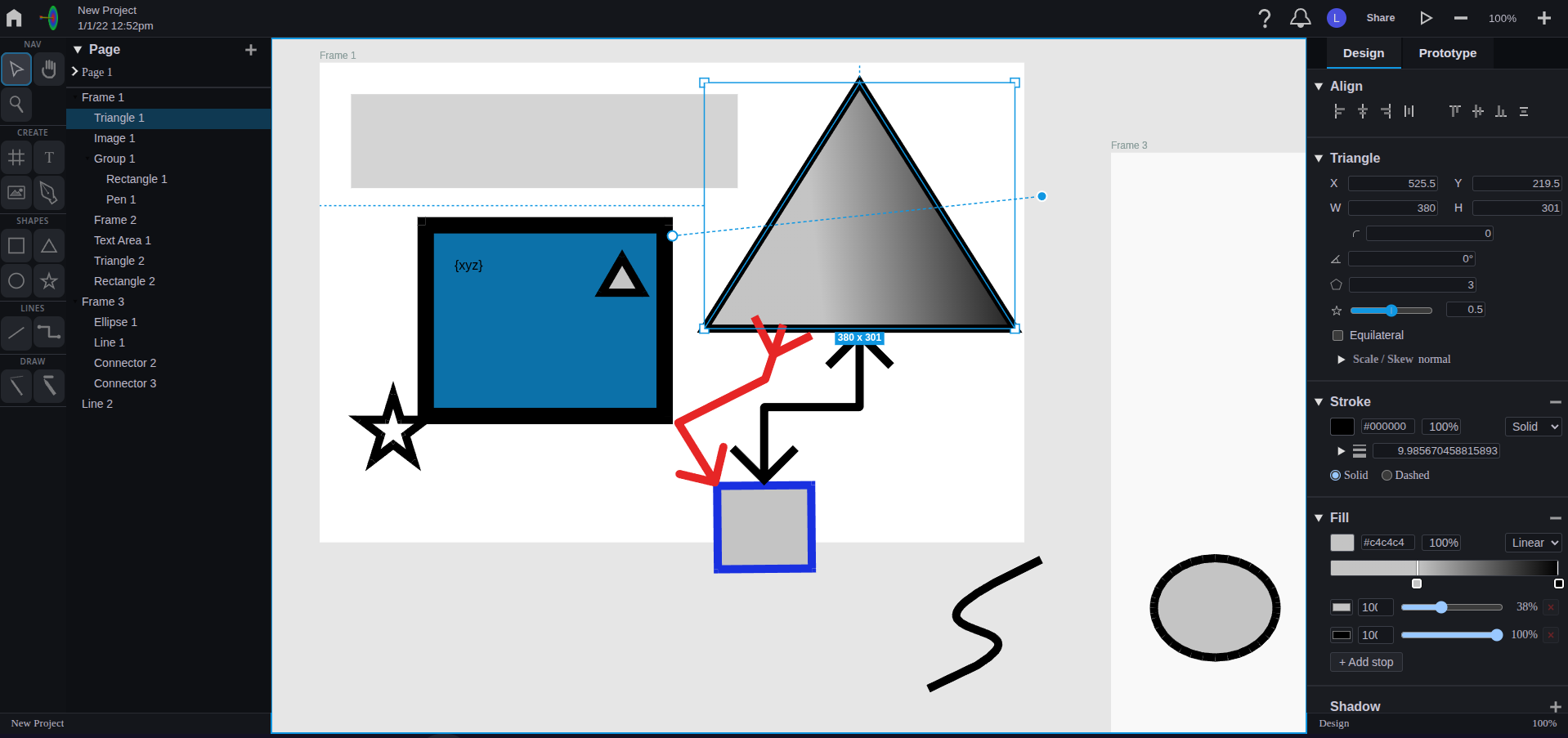
One canvas for design and prototype.
Most tools split design and prototyping into separate modes — or separate apps. The FS Designer keeps them on the same canvas, so iteration is a tab away, not a context switch.
Design
Vector shapes, text, gradients, and Bezier pen paths. Boolean operations that flatten cleanly thanks to a fuzz-tested clipping engine underneath.
Prototype
Add click, drag, hover, and key-down triggers to anything on the canvas. Navigate frames, set variables, and branch on conditions.
Iterate
Full undo/redo, auto-save with versioning, SVG import, and copy-out to the system clipboard as SVG when you need to hand work off.
Built for real design work.
A working subset of what's in the alpha. More is shipping every week between now and June.
Shapes & text
Rectangles, ellipses, triangles, stars, regular polygons, and text with full font, weight, and alignment control. Direct manipulation on canvas or numeric input on the side panel.
Boolean operations
Union, intersection, difference, exclusion, and outline — backed by a Martinez-Rueda polygon clipping engine with thousands of fuzz tests behind it.
Bezier pen tool
Draw paths with full handle and node editing. Snap to grid, existing nodes, or segments while you work, and edit handles non-destructively.
Fill, stroke, shadow
Solid colors, linear and radial gradients with editable stops, dashed strokes with configurable width and alignment, and drop shadows on any shape.
Prototype interactions
Click, drag, hover, and key-down triggers on any object. Actions for navigating frames, scrolling, opening external links, setting variables, and conditional if/then branching.
Pages, frames, constraints
Multi-page projects with hierarchical groups, alignment tools, z-order control, and responsive constraints so child elements stay put when their frame resizes.

Step one of a bigger idea.
I hadn't spent much time inside vector graphics or prototyping apps before starting to develop this app about three years ago. I came to it from the software and UI/UX side, which made me want a tool that was easy to use — but still powerful enough to do real work.
The FS Designer is just the start. It's the first in a series of apps that come together to enable Intent Driven Software Development: one toolkit for designing apps, websites, and information systems — interface, code, database, and AI design in the same place — that exports cleanly to all the major languages and platforms.
Join the alpha →Want early access?
Alpha opens June 2026. Create your account to get started.
Join the alpha →or text (480) 276-5806